New Helpdesk, from the Projecto team

Help desk ticketing system
with an owner and a deadline for every request

Collect customer requests and complaints from email, the portal and the phone in one place. The system routes each one to the right team, watches the SLA and measures customer satisfaction — in Arabic and English.
Leave your number and we will call you with a demo

  • Arabic and English interface
  • Runs in the browser, on desktop and mobile
  • A quote sized to your team
Or see how it works →
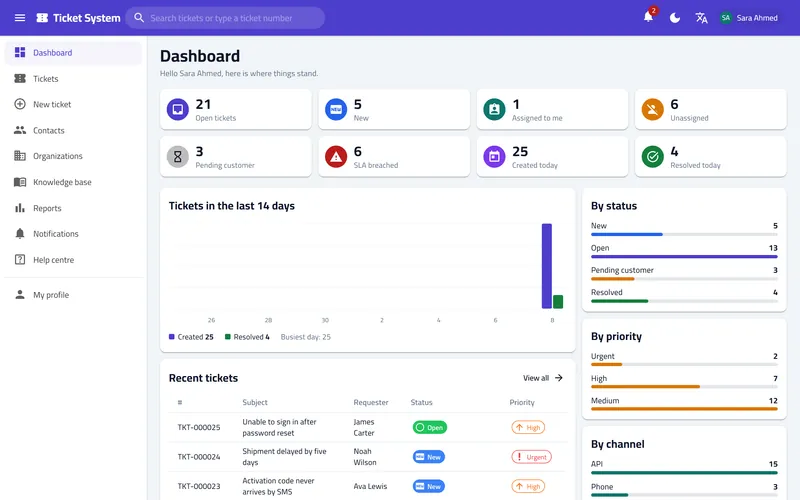
Helpdesk dashboard: open, new and SLA-breached tickets and the latest requests

Helpdesk comes from the Projecto team — the platform trusted by 3,000+ organizations

Riyadh Region Municipality Ministry of Health Jeddah Municipality Technical and Vocational Training Corporation General Commission for Audiovisual Media Qassim Region Municipality

Are customer requests getting lost
between emails and calls?

When customer service runs on a shared mailbox, chat groups and scattered spreadsheets, the same scenes repeat every day.

  • Requests get lost in the inbox
    A customer email nobody answered, because everyone thought a colleague had it
  • Nobody knows who owns the request
    The customer asks "where is my request?" and there is no clear status or owner
  • Reply deadlines pass unnoticed
    No deadline per priority, and no warning before a reply is late
  • No numbers on performance or satisfaction
    How many requests and complaints came in? How many were solved? How long did it take?
The answer: Projecto Helpdesk

Every request is a ticket. Every ticket has an owner.

One place for every customer request and complaint, from the moment it arrives until it is solved and rated.

Every email or call becomes a ticket with a number, a status and an owner
Fair automatic distribution across the team
An SLA for each priority, with a warning before it is breached
Customers follow up and reply from the portal or from their inbox
A knowledge base that answers the repeated questions before they become tickets
Reports on volume, response speed, satisfaction and each agent

From request to resolution in 3 steps

One clear journey for every request: it arrives, it is routed and handled, then it is measured.

1

Receive from every channel

An email becomes a ticket, and replies are added to the same ticket. Customers open requests in the portal, agents log phone calls, and your systems send through the API.

Email
Customer portal
Phone and REST API
2

Route and resolve

Automation rules classify the ticket and assign it to the right team, and the SLA timers start. Agents reply with a rich editor and canned responses, and discuss with colleagues in internal notes.

Round-robin assignment
A deadline per priority
Internal notes
3

Measure and improve

After the ticket is solved the customer gets a one-click satisfaction survey. Reports show volume, response speed, resolution time, SLA compliance and each agent.

Customer satisfaction survey
Custom date ranges
CSV export

Everything a support team needs
in one system

Complete customer support software: from receiving a request or complaint to the monthly report — without scattered tools.

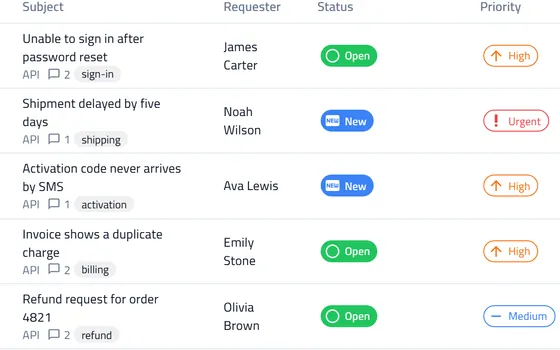
Ticket list: subject, requester, status and priority

A workspace for tickets

Ready-made views such as "Mine", "Unassigned" and "SLA breached", views you save for yourself, search, bulk actions and export.
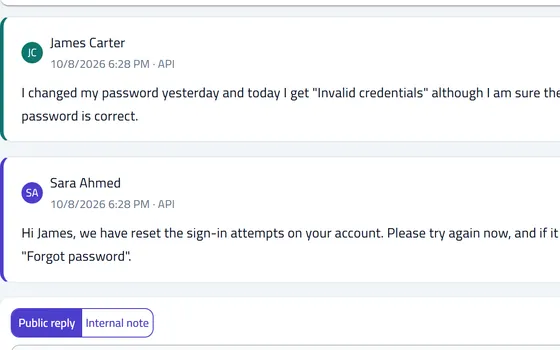
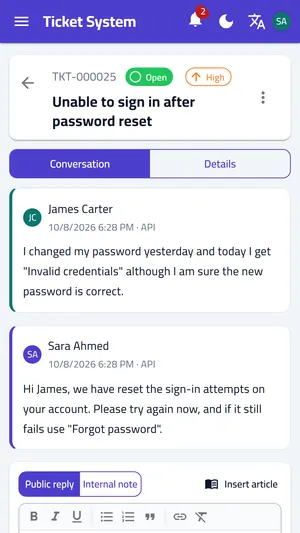
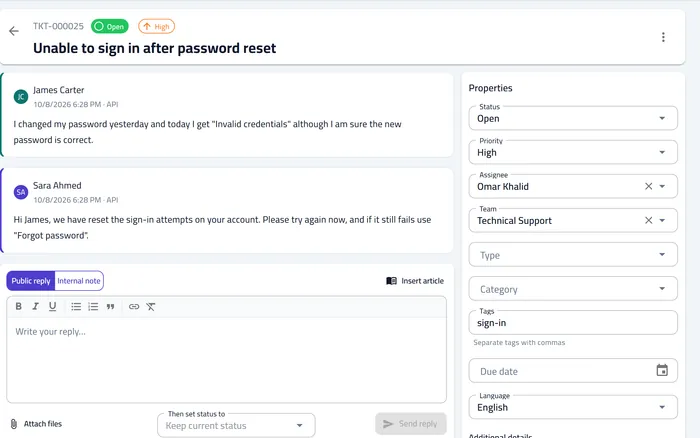
Ticket screen: the customer message, the agent reply and the reply editor

The whole conversation on one screen

Public replies with a rich editor and attachments, internal notes the customer never sees, canned responses, and a history of every change.
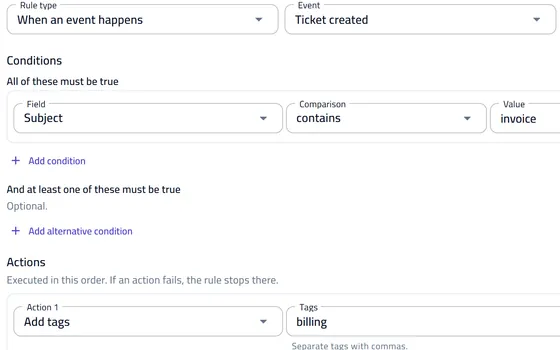
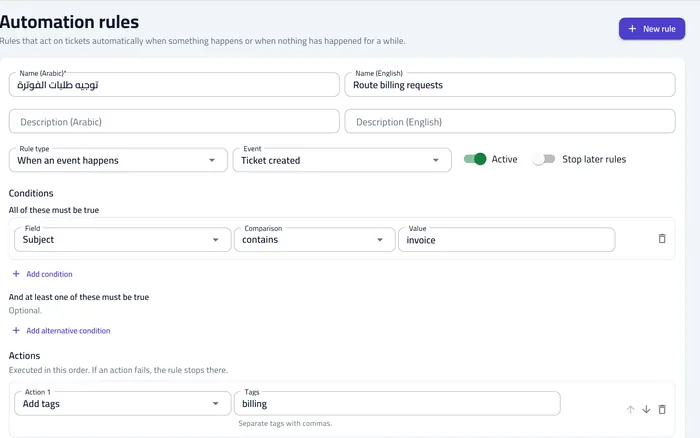
Automation rule editor: a condition on the ticket subject and an add-tags action

No-code automation

Event rules and time-based rules: classify, assign, change status or priority, follow up on stale tickets and close solved ones automatically — and test a rule before you switch it on.

Example:Subject contains "invoice" → Billing team + "billing" tag

Service level agreements (SLA)

A deadline for the first response, the next response and the resolution for each priority, counted in your business hours and holidays, with a warning before and at the breach.
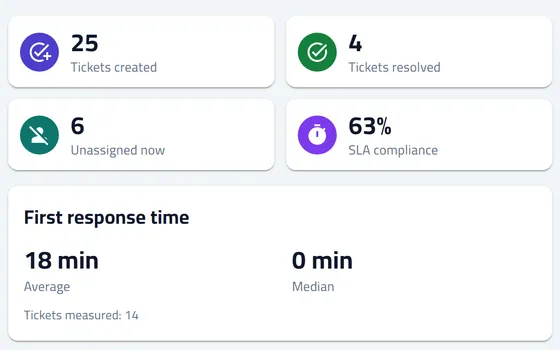
Reports page: tickets created and resolved, SLA compliance and first response time

Reports that measure performance

Ticket volume and trend, average and median response and resolution times, SLA compliance, customer satisfaction and each agent — with CSV export.
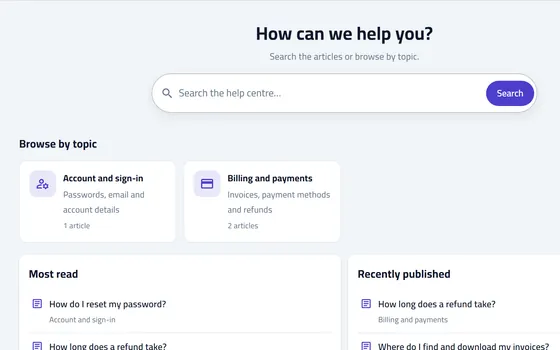
Public help center: article search and browsing by topic

Knowledge base and help center

Articles in both languages with review and publishing. Customers search them without signing in, and agents insert them into a reply in one click.

Fine-grained permissions

Six ready-made roles, and every user sees only what concerns them: customers their own requests, organization managers their organization's requests.

Customers and organizations

A record for every customer, their organization and their past tickets, with custom fields you add yourself.

Notifications and satisfaction survey

Emails to the customer on receipt, reply and resolution with a link to rate the service, and agent notifications in the app or by email as they choose.

Open integration

A REST API with scoped keys, and signed webhooks that notify your systems of every event.

One system for every team that serves others

Whether you serve customers or your own staff, the method is the same: a clear request, a named owner and a known deadline.

Faster replies, and customers who know where their request stands

Every question or complaint gets a number, a status and an owner, and the customer follows up by email or in the portal.
1
The customer emails support or opens a request in the portal
The ticket is created at once and the customer receives a confirmation with the request number.
2
The system assigns the ticket to an agent
Fair round-robin distribution, and the response and resolution timers start according to the priority.
3
The agent replies and solves it
Canned responses and help articles save time, and internal notes keep the discussion with colleagues.
4
The customer rates the service
A one-click satisfaction survey after resolution, and the result shows up in the reports.
A customer ticket: the conversation, the reply box and the ticket properties

A help desk for your own staff

Requests for devices, accounts and access in one place instead of scattered messages.
1
The employee sends a request
From the portal or by email, with a request type and the custom fields you define.
2
An automation rule routes it
Account requests go to one team and device requests to another, by type or subject.
3
Tracked until done
Statuses such as "On hold" pause the SLA clock, and every change is recorded in the history.
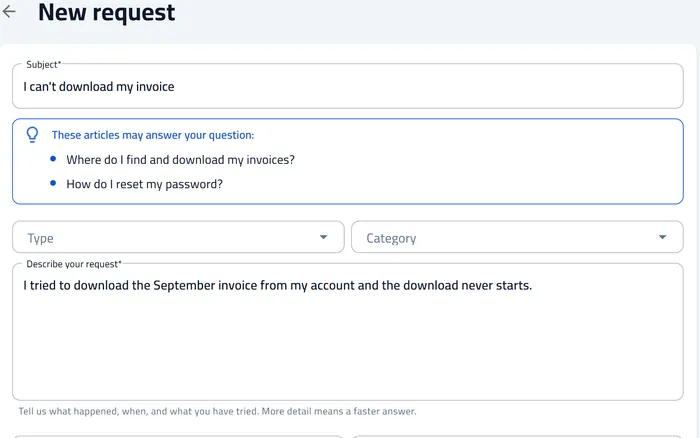
New request form in the portal: subject, type, category and description

Invoice and refund questions without the wait

Financial requests reach the right team from the first moment, with the right priority.
1
Billing requests are recognized automatically
A rule picks up words such as "invoice" in the subject, adds the tag and assigns the team.
2
A shorter deadline for urgent requests
An SLA policy for high priority, with a warning to the team lead before the breach.
3
Connected to your accounting system
A webhook notifies your system when a ticket is created or solved, and the API updates the ticket from it.
An automation rule that catches billing requests and tags them

Ready answers that reduce the number of tickets

What customers keep asking is written once, and they find it themselves.
1
Write articles in both languages
Draft, review, then publish, with a version history and control over who sees each article.
2
Customers search the help center
Search that understands Arabic spelling variants, browsing by topic, and no sign-in needed.
3
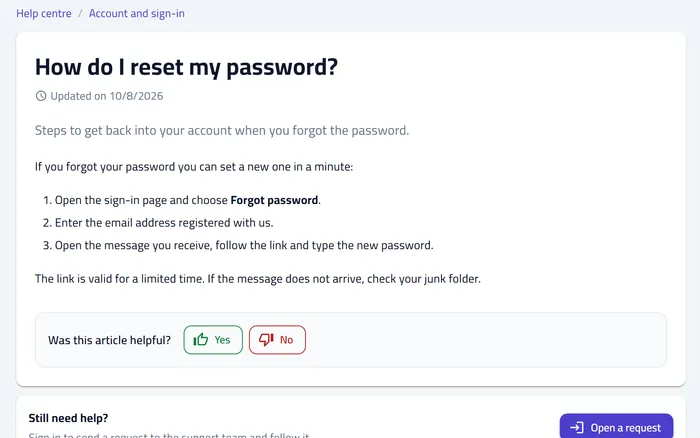
Suggestions while writing a request
Matching articles appear before the customer submits, so they find the answer without waiting.
A help center article with the question "Was this article helpful?"

Everyone sees
only what concerns them

Fine-grained permissions for every operation, and a log of every administrative change: who changed what, and when.

A permission for every operation
Every action in the system is tied to an explicit permission
Audit log
Administrative changes and sign-ins are recorded
Encrypted secrets
Mailbox passwords and integration keys are stored encrypted
Account protection
Email confirmation, and sessions end when the password changes
Six ready-made roles

A role for everyone

Start with the ready-made roles; permissions decide what each user sees and does.

1
Administrator — settings, users and everything else
2
Supervisor — all tickets, full reports and article publishing
3
Agent — their own tickets, their teams' tickets and unassigned ones
4
Viewer — read-only, with no replies or changes
5
Customer — their own requests, in the portal
6
Organization manager — all requests of their organization

Two systems from one team, each with its own job

Helpdesk is a companion system that runs alongside Projecto: one for the people you serve, the other for your team on the inside.

For your team on the inside

Projecto

Projects, tasks, workflows and approvals.

Discover Projecto →
For the people you serve

Helpdesk

Receiving customer requests, following them to resolution and measuring satisfaction.

Request a demo →

Everything you want to know

Answers to the most common questions about the ticketing system

Helpdesk is a companion system from the Projecto team that runs alongside it: Projecto manages projects, tasks and workflows inside your team, and Helpdesk receives your customers' requests, follows them to resolution and measures satisfaction.
From email (every message that reaches the support mailbox becomes a ticket, and replies are added to the same ticket), from the customer portal, from an agent logging a phone call, and from your own systems through the REST API. Chat channels such as WhatsApp are not supported at the moment.
You connect the support mailbox to the system, and every new message that arrives becomes a ticket with a number and an owner, while your customers keep writing to the same address. Their replies to the system's emails are added to the same ticket instead of starting a new thread.
No. The system runs in the browser on desktop and mobile, and neither your agents nor your customers need to install any software.
Yes. The interface is right-to-left in Arabic and left-to-right in English, and every user picks their language. Email templates and help articles exist in both languages, and search understands Arabic spelling variants.
For each priority you set a deadline for the first response, the next response and the resolution, counted in your business hours and holidays. The clock pauses while you wait for the customer, and the agent and the team lead are warned before the deadline and when it is breached.
Yes. Every complaint or suggestion becomes a ticket with a number, an owner and a deadline. You mark it with a type, a category and tags, then follow the counts, the resolution time and the satisfaction of the people who raised them in the reports.
Yes. A REST API with scoped keys creates, replies to and updates tickets, and signed webhooks are sent to your systems on every event, with automatic retries and a log of every delivery.
Yes. The customer portal shows their requests and statuses, lets them reply and rate the service after resolution. The public help center shows articles without signing in, and matching articles are suggested while they write a request.
The system is available on request. Leave your details in the form on this page and we will contact you to show the system on your own case, then send a quote sized to your team.
Early access

Be among the first teams
to run support on Helpdesk

The system is available on request: we show it on your own case — your channels, your teams and the SLAs you commit to — then send a quote sized to your team.

Arabic and English interface
Web and mobile
REST API and webhooks
From the Projecto team

Request a demo
of the ticketing system

Enter your details and we will contact you to show the system on your team's needs.

A live demo, in Arabic or English
Your channels, teams and SLAs set up
Answers to your technical and integration questions
A quote sized to your team

Request a demo

Name and mobile number are enough; the other fields help us prepare the demo.

We handle your data under our privacy policy.

Request a demo